
Taller de Pre-Produccion
Hola chamakotas encontre una pagina para estudiantes de 12th grade que llevan un aclase de produccion y yo les pondre aqui los merjores tips que nos serviran a nosotros de este BLOG
Esta en ingles asi que buen punto pa Homie y las demas pues intentemos comprender lo mas
posible
Antes que nada este taller explica como planear y hacer un video
hay 3 pasos para lograrlo llamado pre-produccion ( donde lo planeamos y entra el script el sotyboardsgoals and objectives of your video, target audience, treatment, and budget
la produccion donde ya hacemos el video basados en lo de arriba
y Post Produccion Editarlo sonidos arreglos estilos subirlo a chutub :P
Primer Parte
Pre Produccion y Scripts
Materiales a necesitar:
Template de script ( un templates es una base ya diseniada o hecha de lo que sea que te ofrecen)
Template de Storyboard los links lo tengo en el Tab de Recursos ahi tengo links para storyboards y proximamente uno de script tratare de imprimirlas y repartirles para la proxima junta.
Writing a script can be daunting, but there is an easy way to work through the process.
Outline
Start by writing an outline. List every major point you wish to make on your video. Remember the old method of writing a script:
Which translates to Introduction, Body, Summary. So, your XYZ School outline might look like:
I. Introduction
A. Several long shots of school exterior
B. Shots of interior, physical plant, students and teachers interacting
C. Some two-shots of student-student, student-teacher, teacher-teacher
II. Our new building
A. Brief history of construction of building
B. Swimming pool, little theatre
C. TV studio and production facilities
D. Up-to-date internet access, CATV television system in building
III. Fine arts at our school
A. Music department
B. Drama
C. Speech
IV. School spirit
A. Pep rallies
B. Student council meetings
C. Several shots of students and teachers at sporting event
D. Annual car wash fundraiser for charity
V. Summary
A. What have we seen?
B. What have we learned?
C. For these reasons and more, XYZ School is the perfect educational environment for your student
Notice what we did here. We took the objectives from earlier and used them for our main talking points. It's starting to take shape.
Prepare a script
Here is a big secret in producing a video. You only have two things to work with: picture and sound. So when scripting, what will we see and what will we hear?
Your script is narration and accompanying pictures, word for word. Some people use a storyboard, where they sketch the pictures wanted while writing the narration, sound effects or music.
Other people prefer creating a two-column script, with a description of the pictures used on left (this also includes the titles), narration or music listed on the right.
We all have an idea of how to write the audio (or sound) portion of the script. It's a lot like writing the reports that we've all done in school. One difference is to write for the ear. That is, select words and phrases that are pleasing to the ear, since this will be delivered aloud. Save your flowery prose for another time.
For the video (or picture) column, list every video shot you want. Note if it is a wide shot, medium, close-up, or extreme close-up shot. Be sure to use a lot of different video shots. During narration, you might change shots as frequently as every five seconds or so.
Outline
Start by writing an outline. List every major point you wish to make on your video. Remember the old method of writing a script:
Tell them what you're going to tell them
Tell them
Tell them what you told them
Which translates to Introduction, Body, Summary. So, your XYZ School outline might look like:
I. Introduction
A. Several long shots of school exterior
B. Shots of interior, physical plant, students and teachers interacting
C. Some two-shots of student-student, student-teacher, teacher-teacher
II. Our new building
A. Brief history of construction of building
B. Swimming pool, little theatre
C. TV studio and production facilities
D. Up-to-date internet access, CATV television system in building
III. Fine arts at our school
A. Music department
B. Drama
C. Speech
IV. School spirit
A. Pep rallies
B. Student council meetings
C. Several shots of students and teachers at sporting event
D. Annual car wash fundraiser for charity
V. Summary
A. What have we seen?
B. What have we learned?
C. For these reasons and more, XYZ School is the perfect educational environment for your student
Notice what we did here. We took the objectives from earlier and used them for our main talking points. It's starting to take shape.
Prepare a script
Here is a big secret in producing a video. You only have two things to work with: picture and sound. So when scripting, what will we see and what will we hear?
Your script is narration and accompanying pictures, word for word. Some people use a storyboard, where they sketch the pictures wanted while writing the narration, sound effects or music.
Other people prefer creating a two-column script, with a description of the pictures used on left (this also includes the titles), narration or music listed on the right.
We all have an idea of how to write the audio (or sound) portion of the script. It's a lot like writing the reports that we've all done in school. One difference is to write for the ear. That is, select words and phrases that are pleasing to the ear, since this will be delivered aloud. Save your flowery prose for another time.
For the video (or picture) column, list every video shot you want. Note if it is a wide shot, medium, close-up, or extreme close-up shot. Be sure to use a lot of different video shots. During narration, you might change shots as frequently as every five seconds or so.
SIGUIENTE PASO
ya que tenemos esto
A. Goals.....................What is your video about?
B. Objectives...............Things your audience will recall
C. Treatment...............How will you tell your story?
D. Target Audience........Who will watch this?
E. Budget...................How much time & money?
2. Write an outline. List every major point you wish to make on your video.
3. Prepare a script. You can also do this visually on a storyboard. List every shot you want. Note if it is a wide shot, medium, close-up, or extreme close-up.
RECUERDEN SEAN VISUALES EN TODO IMAGINENSE EL TRABAJO TERMINADO Y COMO PODRIAN FACILITAR TODO AL EDITOR CON SUS IDEAS DESCRIBAN CON DETALLE TODO LOS POSIBLES PROCEDIMIENTOS EN LOGRAR QUE SU IDEA SEA PRODUCIDA POR UN TERCERO.
TIPO DE TOMAS para tener en consideracion cuando haces el script y cuando filmas
Camera shots
The worst thing you can do (at least one of the worst) is to simply turn your camera on, point it at a subject, and let it run on and on. A good video project should have a variety of camera shots. This keeps the viewer interested, allows the director to visually draw attention to important details, and generally helps the flow of the video.
When writing your script (or storyboard), you have two things to work with: picture and sound. While writing narration or dialog (sound) the scriptwriter also needs to visualize what video (pictures) will be on the screen.
Here are several camera shots, the shorthand used in scriptwriting, and some uses for each.
Long Shot (LS):

The long shot is sometimes called an establishing shot. The beginning of a scene is usually a long shot, because that establishes where the scene is taking place. For example, a video shot in the classroom might open with a long shot of the entire classroom, to tell the viewer this is where we're going to be for the next few minutes.
Long shots are good for: illustrating the setting of a scene
Bad for: showing details or holding the viewer's interest for a long time
Medium shot (MS):

A medium shot is a little closer, a little more intimate with the subject. If we go back to our example, after opening your classroom video with a LS of the entire classroom, we might now cut to a M'S of the teacher as he speaks to the class. By the way, the above shot might also be called a "One Shot" because we see one person.

Of course, that would make this MS a "Two Shot." I'm sure you can figure out why.
Medium shots are good for: drawing attention to a person or object without revealing many details.
Bad for: A medium shot is a compromise. As such, it does a good job for a lot of things, but not for revealing detail.
Close Up (CU):
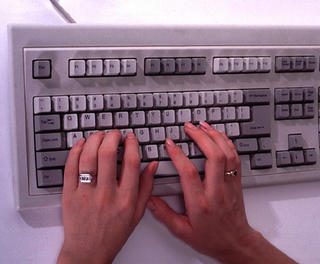
Close ups are when we get up close and personal with the subject or item we wish to illustrate. The close up is the director's way of pointing out something interesting, or essential to the plot, without any other visuals distracting the viewer.
Back to that classroom video for an example. We open with the LS of the classroom, then cut to a MS of the teacher talking about how important keyboarding skills are. At this point, we might show someone in CU typing on the keyboard while the teacher talks.
Good for: drawing attention to important detail. Also good for cutting away from the action to allow the editor to cut two takes of a scene together.
Bad for: establishing scenes.
Extreme Close Up (ECU):
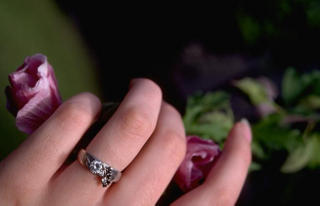
The extreme close up draws attention to something by getting extremely close. In this case, it has to be essential to the plot development, and it has to be approached gradually. If Sue has a new class ring, we can't go directly from a MS of Sue talking about her ring to an ECU of the ring; that is too jarring to the viewer. You have to work your way to getting closer to the ECU.
Like this:
LS classroom
MS teacher talking about keyboarding
CU Sue typing on keyboard
MS teacher saying that the new class rings are available and that some students already have one
ECU Sue's hand wearing ring as she types
The ECU is good for: extreme detail when important to the plot
Bad for: everything else
When deciding on what shots to use, try to imitate the human eye and how it works with the brain to receive and interpret information. If you walked into a classroom, the first thing you would do is look around. In effect, your eye is getting an "establishing shot" or LS of the classroom. If the teacher is speaking to the class, you'd probably look at the teacher next. That is your MS, and probably a "one shot" as well. As the teacher mentioned keyboarding, you might look at someone typing on a keyboard, and your eye sees a CU of hands on a keyboard. And so on.
Watch a television show, preferably a scripted show rather than a "reality" show. Identify the various camera shots you see: LS, MS, CU, ECU, one shot, two shot. See when they are used in the script and what effect they have on telling the story.
When writing your script (or storyboard), you have two things to work with: picture and sound. While writing narration or dialog (sound) the scriptwriter also needs to visualize what video (pictures) will be on the screen.
Here are several camera shots, the shorthand used in scriptwriting, and some uses for each.
Long Shot (LS):

The long shot is sometimes called an establishing shot. The beginning of a scene is usually a long shot, because that establishes where the scene is taking place. For example, a video shot in the classroom might open with a long shot of the entire classroom, to tell the viewer this is where we're going to be for the next few minutes.
Long shots are good for: illustrating the setting of a scene
Bad for: showing details or holding the viewer's interest for a long time
Medium shot (MS):

A medium shot is a little closer, a little more intimate with the subject. If we go back to our example, after opening your classroom video with a LS of the entire classroom, we might now cut to a M'S of the teacher as he speaks to the class. By the way, the above shot might also be called a "One Shot" because we see one person.

Of course, that would make this MS a "Two Shot." I'm sure you can figure out why.
Medium shots are good for: drawing attention to a person or object without revealing many details.
Bad for: A medium shot is a compromise. As such, it does a good job for a lot of things, but not for revealing detail.
Close Up (CU):

Close ups are when we get up close and personal with the subject or item we wish to illustrate. The close up is the director's way of pointing out something interesting, or essential to the plot, without any other visuals distracting the viewer.
Back to that classroom video for an example. We open with the LS of the classroom, then cut to a MS of the teacher talking about how important keyboarding skills are. At this point, we might show someone in CU typing on the keyboard while the teacher talks.
Good for: drawing attention to important detail. Also good for cutting away from the action to allow the editor to cut two takes of a scene together.
Bad for: establishing scenes.
Extreme Close Up (ECU):
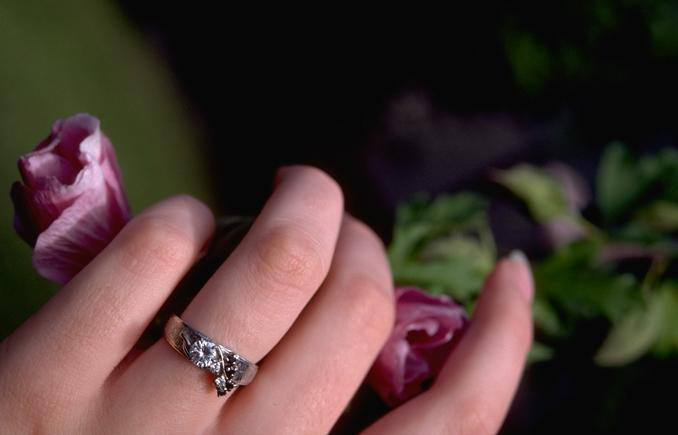
The extreme close up draws attention to something by getting extremely close. In this case, it has to be essential to the plot development, and it has to be approached gradually. If Sue has a new class ring, we can't go directly from a MS of Sue talking about her ring to an ECU of the ring; that is too jarring to the viewer. You have to work your way to getting closer to the ECU.
Like this:
LS classroom
MS teacher talking about keyboarding
CU Sue typing on keyboard
MS teacher saying that the new class rings are available and that some students already have one
ECU Sue's hand wearing ring as she types
The ECU is good for: extreme detail when important to the plot
Bad for: everything else
When deciding on what shots to use, try to imitate the human eye and how it works with the brain to receive and interpret information. If you walked into a classroom, the first thing you would do is look around. In effect, your eye is getting an "establishing shot" or LS of the classroom. If the teacher is speaking to the class, you'd probably look at the teacher next. That is your MS, and probably a "one shot" as well. As the teacher mentioned keyboarding, you might look at someone typing on a keyboard, and your eye sees a CU of hands on a keyboard. And so on.
Watch a television show, preferably a scripted show rather than a "reality" show. Identify the various camera shots you see: LS, MS, CU, ECU, one shot, two shot. See when they are used in the script and what effect they have on telling the story.


No comments:
Post a Comment